Historical bars API returning empty data for all symbols

I created an Alpaca account on October 11, 2025. The account has been approved and on free tier. I’m getting empty results from the historical bars API for all symbols tested (SPY, AAPL, MSFT, TSLA, QQQ). I also tried getting active symbols first and then tried to get bars for them but still returned empty for all of them. Although, get_all_assets() , get_account(), and get_clock() using the TradingClient work successfully.

API Details:

  • Endpoint: GET https://data.alpaca.markets/v2/stocks/bars
  • SDK: alpaca-py version 0.42.2
  • Client: StockHistoricalDataClient
  • Request: StockBarsRequest with daily timeframe
  • Date range: September 20 - October 10, 2025
  • Feed parameter: Tested with DataFeed.SIP, DataFeat.IEX, and default (None)

Code:

from alpaca.data.historical import StockHistoricalDataClient
from alpaca.data.requests import StockBarsRequest
from alpaca.data.timeframe import TimeFrame
from alpaca.data.enums import DataFeed

client = StockHistoricalDataClient(api_key=key, secret_key=secret)
request = StockBarsRequest(
    symbol_or_symbols=[“SPY”, “AAPL”, “MSFT”],
    timeframe=TimeFrame.Day,
    start=datetime(2025, 9, 20),
    end=datetime(2025, 10, 10),feed=DataFeed.SIP)
bars = client.get_stock_bars(request)

bars is empty for all symbols

Results:

  • API calls succeed (200 OK, no errors)
  • BarSet object is empty for all symbols
  • Tested with both paper trading keys and live individual brokerage account keys

Is there a delay after account approval before historical data access is enabled? Do I need to activate a specific market data plan?

Please help understand why I may be getting empty market data for all symbols.
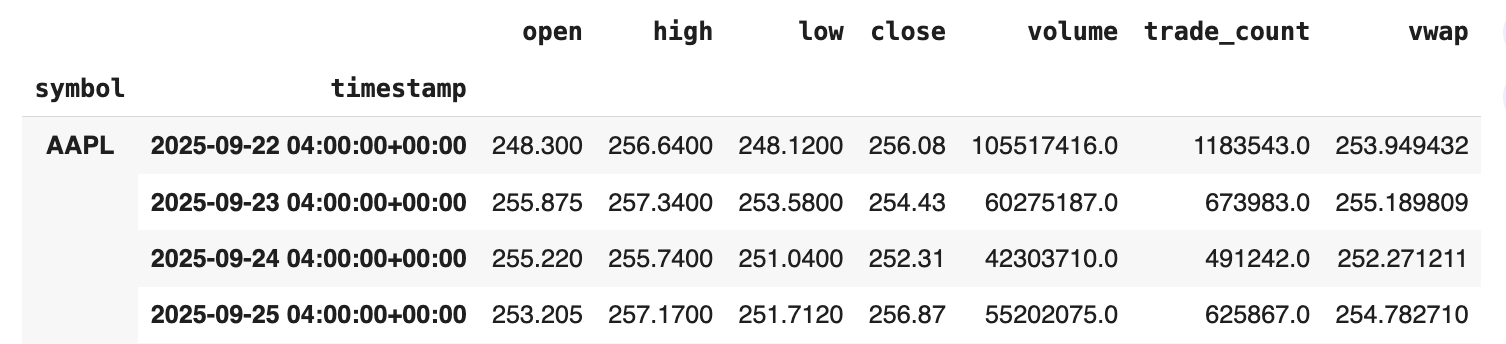
@rishabdulam First off welcome to Alpaca! You stated you are getting “empty results” from the historical bars API for all symbols. I ran the code you posted and received results as shown below. Not sure why you didn’t?

Here is the exact code I ran. Notice the .df method. It’s a convenient way to convert the BarSet result into a dataframe which is often easier to manipulate.

!pip install -q alpaca-py

from datetime import datetime

from alpaca.data.historical import StockHistoricalDataClient
from alpaca.data.requests import StockBarsRequest
from alpaca.data.timeframe import TimeFrame
from alpaca.data.enums import DataFeed

client = StockHistoricalDataClient(api_key='xxxx', secret_key='xxxx')

request = StockBarsRequest(
    symbol_or_symbols=['SPY', 'AAPL', 'MSFT'],
    timeframe=TimeFrame.Day,
    start=datetime(2025, 9, 20),
    end=datetime(2025, 10, 10),
    feed=DataFeed.SIP)

bars = client.get_stock_bars(request)

display(bars.df)

Here is a snippet of the displayed result.

A subtle point about API keys. Any keys from any of your accounts will work and will access the same data. Your market data subscription is tied to your owner_id. The only reason API keys are used to fetch data is so the system 1) can find the account associated with the keys 2) lookup theowner_id of that account and then 3) lookup which data subscription is associated with that owner_id. Since all accounts (paper and live) held by an owner have the sameowner_id, any API keys can be used (paper or live) to access market data and it will be the same data.

I can check the Alpaca logs for your queries and get details which will help troubleshoot if you wish, but need a bit of information.

  • What is what is a specific request you made? For example
request = StockBarsRequest(
    symbol_or_symbols=['SPY', 'AAPL', 'MSFT'],
    timeframe=TimeFrame.Day,
    start=datetime(2025, 9, 20),
    end=datetime(2025, 10, 10),feed=DataFeed.SIP)
bars = data_client.get_stock_bars(request_params=bars_request)

  • What is the API key you used (not secret)?
  • About what time did you make the request? Include the timezone.

From that I can check the logs and verify the returned results.

Hi Dan,

Thank you very much for helping me identify the issue.

The problem was in how I was checking the BarSet response. I was using:

if symbol in bars:  # This always returns False!

Instead of properly accessing the data via:

bars[symbol]  # Direct access works
# or
bars.data[symbol]  # Via .data dict
# or  
bars.df  # DataFrame (most convenient)

The in operator doesn’t work on BarSet objects - it always returns False even when data exists. Once I switched to using bars.df or bars.data, everything worked perfectly.

Appreciate the clarification on API keys and owner_id - that’s helpful to know all my keys access the same data subscription.

Special thanks, and I’m grateful for your quick response!

@rishabdulam Glad you figured it out. Yes, I too find some of the alpaca-py object classes do not behave as I would expect. Under the hood, alpaca-py uses Pydantic for the class models, which seems to overwrite some of the core Python handling.